 Esby
Esby All four documents, in full.
For a GST app there is really only one question: are the documents it produces ones your accountant will accept? So here is the complete set — shown on the page, not just offered as a download.
Generated by the app itself from one invented month. The business and the buyers are fictional; the numbering, the tax split, the HSN codes and the arithmetic are the app's real output.
Tax invoice
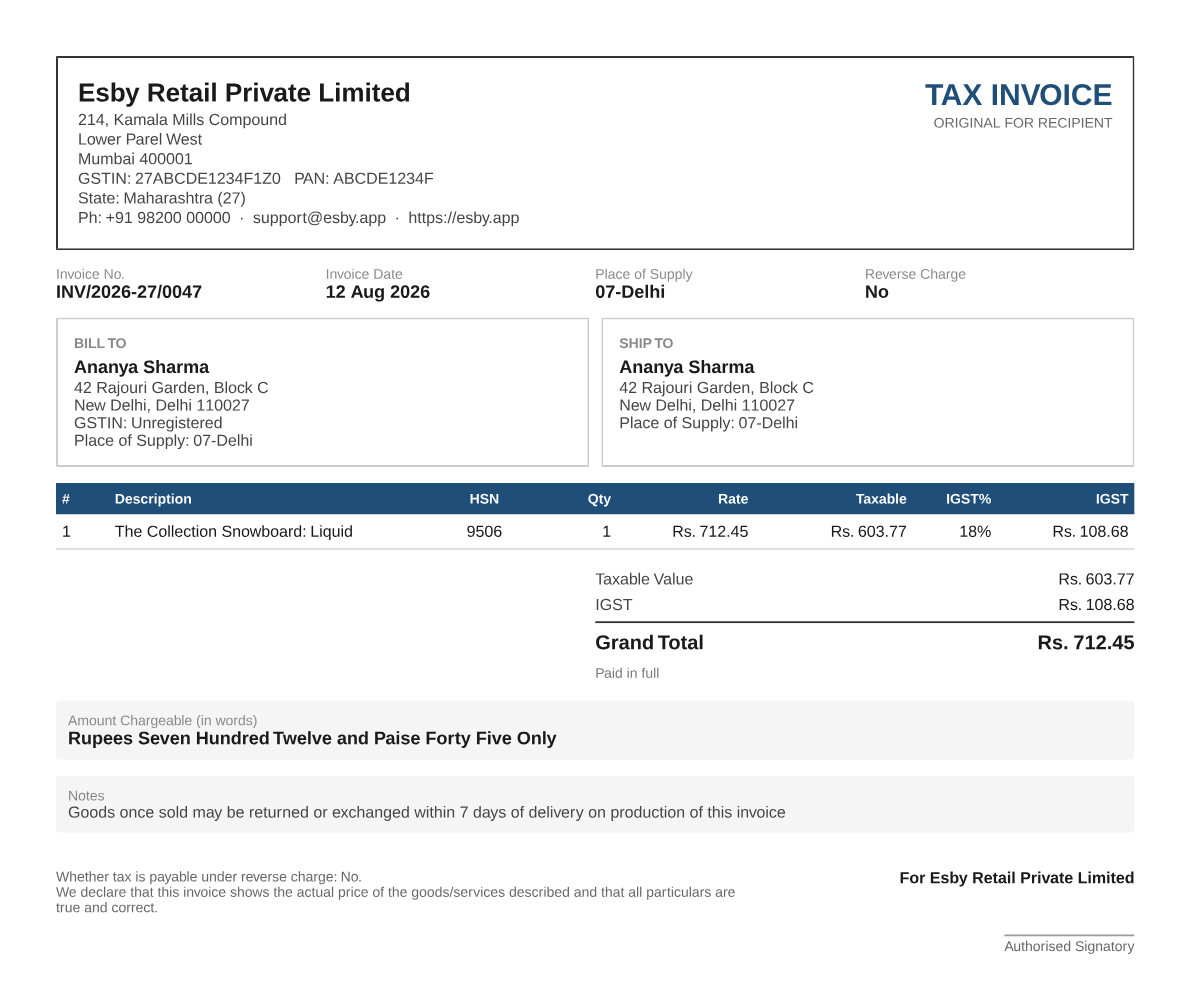
An inter-state sale — Maharashtra seller, Delhi buyer — so the tax is a single IGST line rather than a CGST/SGST split. This is the document your customer receives by email.
Credit note
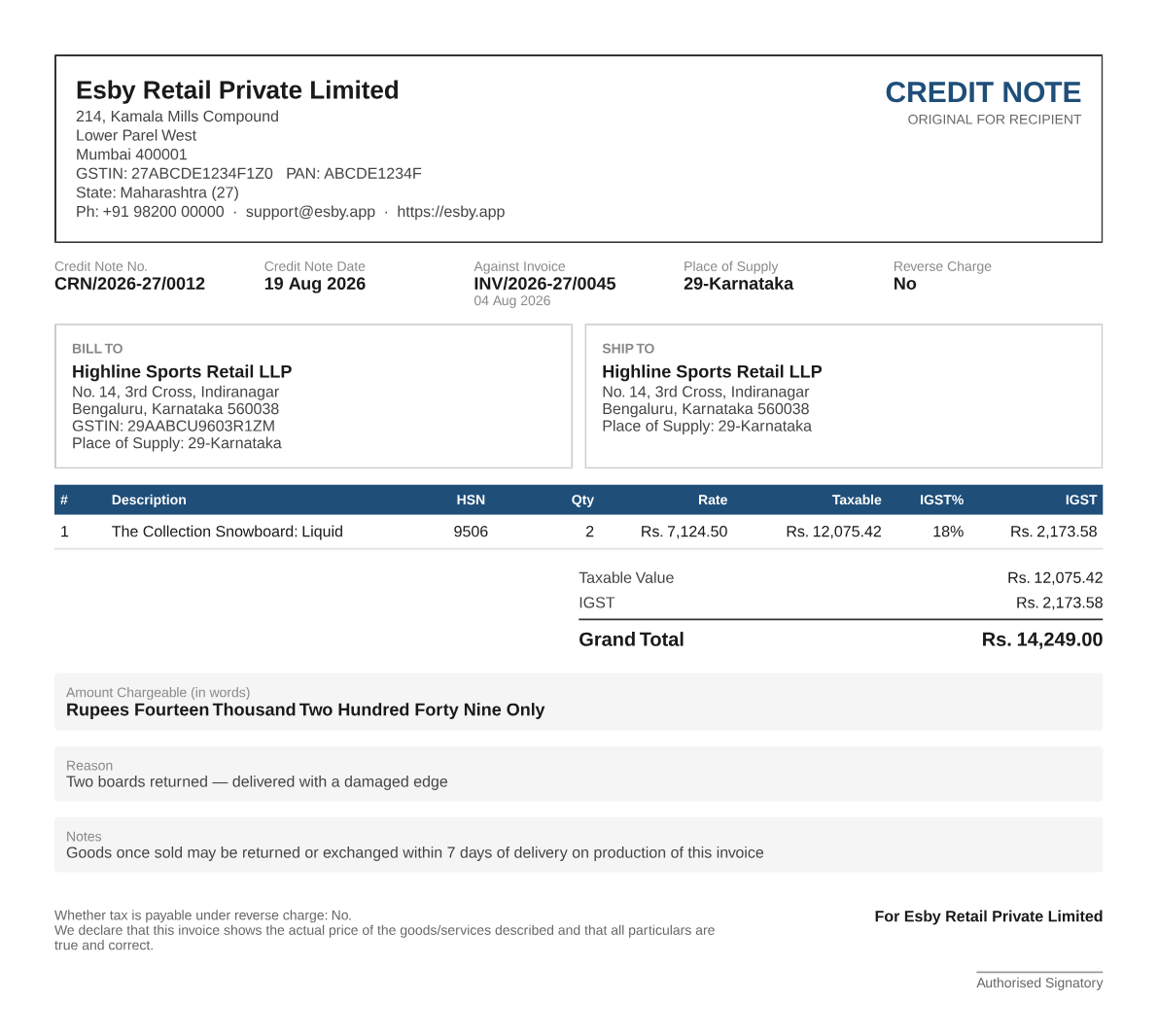
What a refund produces. It names the invoice it reverses and the date of that invoice, carries its own separate number series, and reverses tax at the rate originally charged.
GSTR-1 worksheet
One month laid out in the sections your return needs. Below is the real content of the sample workbook — 4 invoices and 1 credit note for 08-2026, split across the sheets an accountant expects.
| GSTIN of recipient | Invoice no. | Date | Value | Place of supply | Rate | Taxable | IGST |
|---|---|---|---|---|---|---|---|
| 29AABCU9603R1ZM | INV/2026-27/0045 | 04-Aug-2026 | 48,063.00 | Karnataka | 18% | 40,731.35 | 7,331.65 |
| Type | Place of supply | Rate | Taxable | IGST | CGST | SGST |
|---|---|---|---|---|---|---|
| INTRA | Maharashtra | 18% | 7,500.00 | 0.00 | 675.00 | 675.00 |
| INTRA | Maharashtra | 12% | 1,000.00 | 0.00 | 60.00 | 60.00 |
| INTER | Delhi | 18% | 603.77 | 108.68 | 0.00 | 0.00 |
| GSTIN of recipient | Note no. | Date | Value | Rate | Taxable | IGST |
|---|---|---|---|---|---|---|
| 29AABCU9603R1ZM | CRN/2026-27/0012 | 19-Aug-2026 | 14,249.00 | 18% | 12,075.42 | 2,173.58 |
| HSN | Description | UQC | Qty | Rate | Taxable | Total tax |
|---|---|---|---|---|---|---|
| 9506 | The Collection Snowboard: Liquid | NOS | 46 | 18% | 2,73,763.09 | 49,277.36 |
| 3404 | Selling Plans Ski Wax | NOS | 12 | 18% | 4,505.08 | 810.92 |
| 4911 | Printed Gift Voucher Booklet | NOS | 2 | 12% | 1,000.00 | 120.00 |
The workbook also carries a summary sheet and a "documents issued" sheet recording your number ranges for the month.
Tally export
The same month as Tally import vouchers. Every sale becomes a Sales voucher with its ledgers and tax already set, and every refund a Credit Note voucher with each side reversed. Here is the voucher for the invoice shown at the top of this page.
<VOUCHER VCHTYPE="Sales" ACTION="Create" OBJVIEW="Accounting Voucher View">
  <DATE>20260812</DATE>
  <VOUCHERTYPENAME>Sales</VOUCHERTYPENAME>
  <VOUCHERNUMBER>INV/2026-27/0047</VOUCHERNUMBER>
  <PARTYLEDGERNAME>Ananya Sharma</PARTYLEDGERNAME>
  <PERSISTEDVIEW>Accounting Voucher View</PERSISTEDVIEW>
  <ISINVOICE>No</ISINVOICE>
  <NARRATION>Place of supply 07-Delhi</NARRATION>
  <LEDGERENTRIES.LIST>
    <LEDGERNAME>Ananya Sharma</LEDGERNAME>
    <ISDEEMEDPOSITIVE>Yes</ISDEEMEDPOSITIVE>
    <ISPARTYLEDGER>Yes</ISPARTYLEDGER>
    <AMOUNT>-712.45</AMOUNT>
  </LEDGERENTRIES.LIST>
  <LEDGERENTRIES.LIST>
    <LEDGERNAME>Sales</LEDGERNAME>
    <ISDEEMEDPOSITIVE>No</ISDEEMEDPOSITIVE>
    <AMOUNT>603.77</AMOUNT>
  </LEDGERENTRIES.LIST>
  <LEDGERENTRIES.LIST>
    <LEDGERNAME>IGST</LEDGERNAME>
    <ISDEEMEDPOSITIVE>No</ISDEEMEDPOSITIVE>
    <AMOUNT>108.68</AMOUNT>
  </LEDGERENTRIES.LIST>
</VOUCHER>
Tally matches ledgers by name, so an accountant who calls the sales ledger something else can rename it once and re-import.
Five things to check on any GST invoice.
Useful whichever app you end up choosing. If you are comparing us against something else, compare these.
Place of supply
The most important line on the whole document, and the one nobody looks at. It decides whether you owe CGST + SGST or IGST. On the invoice above it reads 07-Delhi, while the seller is registered in Maharashtra (27) — which is exactly why the tax below it is a single IGST line.
The tax lines
A buyer in your own state gets CGST and SGST at half the rate each. A buyer anywhere else gets a single IGST line at the full rate. Esby decides this from the shipping address, not from a setting you have to remember to change.
HSN code per line
Every line carries the HSN code and rate you set for that product — 9506 at 18% in the example above. Two products at different GST rates on one order stay at their own rates; they are never averaged.
Taxable value vs total
Shipping is apportioned across the lines in proportion to their value, so freight on an 18 percent item is taxed at 18 percent and freight on a 12 percent item at 12 percent. It is not dumped onto a single line or swept into the round-off. The line values add up to the total exactly.
The invoice number
One unbroken series per financial year, restarting on 1 April — INV/2026-27/0047 above. Credit notes run in their own separate series, so a refund never creates a gap in your sales numbering.
One trap worth knowing about
If an app cannot work out the buyer's state, the safe-looking thing to do is fall back to the seller's own state — which produces a CGST + SGST invoice that is byte-for-byte identical to a genuine local sale. There is no way to spot it except by reading the place of supply line. That is why it is the first thing listed above, and why Esby prints it across the top of the invoice rather than tucking it into a corner.
Happy with the documents?
Install it and your next dispatched order produces an invoice just like the one above, automatically.